



















































Система ⇒ Windows 10 Bloat Remover and Tweaker 5.0
|
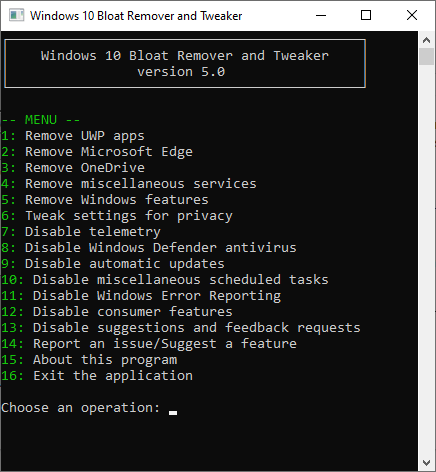
Windows 10 Bloat Remover and Tweaker - это инструмент, предназначенный для удаления не нужных программ и отключения определенных функций, которые обычно занимают место и иногда влияют на общую функциональность системы. Приложение представляет собой инструмент командной строки и, следовательно, не требует установки. Если вы хотите настроить его, вы можете сделать это из файла JSON, созданного после первого запуска.
You can remove Edge, OneDrive and other UWP apps
By far the most important feature of the utility is that it can make the system apps removable by editing the internal system database. Therefore, you can now just remove Microsoft Edge along with the legacy UWP version of the browser. Thanks to this tool, you can finally disable Windows Defender along with its background services.
Speaking of UWP, the tool enables you to remove all UWP apps for the current or all users. In case you opt for the latter version, then the corresponding provisioned packages are also deleted and hence, you don't have to worry that they will end up back on your system or update during new patches.
Allows you to disable telemetry and automatic updates
The tool can disable the Windows components responsible for diagnostics and features that tend to collect information in general. Among the disabled options, you can count Device Census, Compatibility Telemetry and Customer Experience Improvement Program.
In addition, the app can turn off certain Windows 10 features that have a negative impact on your privacy, such as voice activation, clipboard synchronization, app launch tracking or typing personalization.
Lastly, the tool disables the automatic update services in the Group Policies and hence it can prevent the download and installing of the new OS and Windows Store patches. Take note that the disabling does not work on Windows 10 Home edition.
A handy tool that can help improve the overall functionality of Windows 10
All in all, Windows 10 Bloat Remover and Tweaker can come in handy for anyone who wants to improve privacy and the overall performance of their machine.
Скачать программу Windows 10 Bloat Remover and Tweaker 5.0 (4,9 МБ):

|
Другие новости по теме:
|
|

Комментарии
Capture One 23 Pro / Enterprise 16.8.5.3709 + Portable
От: karvik
У меня не сработал патч. Пишет: Отказано в доступе по пути С:/Program Files/Captur....
Tor Browser Bundle 15.0.20
От: PRINCO
Попробуйте менять мосты, а лучше всего пользоваться своими мостами встроенные мосты не всегда работают.Вот вам сканер мостов попробуйте подобрать
KMSAuto Helper 1.1.8
От: raum609
Спасибо!
Wondershare Recoverit 14.0.29.10
От: MagicSounds
Wondershare Recoverit 14.0.35.3
LibreOffice 26.2.4
От: raum609
Спасибо!
Adobe Photoshop 2025 v26.11.7 + macOS + Portable
От: diakov
да.
Adobe Photoshop 2025 v26.11.7 + macOS + Portable
От: Alexachka
Добрый день. А на репак от MonkRus'a встанет? Он старые версии не обновляет, а сносить не хочется
Adobe Photoshop 2025 v26.11.7 + macOS + Portable
От: Carlos garcia
Nos podias ilustrar un poco sobre el tema. A mi me pasa lo mismo que a Oleg no entiendo por que se estan actualizando por dos vias diferentes.
Telegram Desktop Messenger 7.1.1 + Portable
От: mbl800
Спасибо.
USB Device Tree Viewer 4.7.4
От: mbl800
Спасибо.
4K Image Compressor Pro 26.0.0.0300
От: PRINCO
Отличное приложение протестировал его но мне больше нравится Bzzt! Image Editor оно лучше сжимает.
4K Image Compressor Pro 26.0.0.0300
От: PRINCO
Уважаемый Дъяков,несколько лет назад у ва на сайте было приложение Bzzt! Image Editor.Нельзя ли его возобновить ? Bzzt! Image Editor лучше сжимает
Uninstall Tool 3.8.2 Build 5762
От: bekar
diakov, Как всегда, всё исправлено! Спасибо за ваш труд! Удачи!
K-Lite Codec Pack 19.9.5 Mega/Full/Standard/Basic + Update
От: Shufad
Спасибо!
Adobe Photoshop 2025 v26.11.7 + macOS + Portable
От: diakov
это не старая версия, линейку развивают параллельно 2026.