




















































Графика ⇒ Saola Animate Pro 3.1.4
|
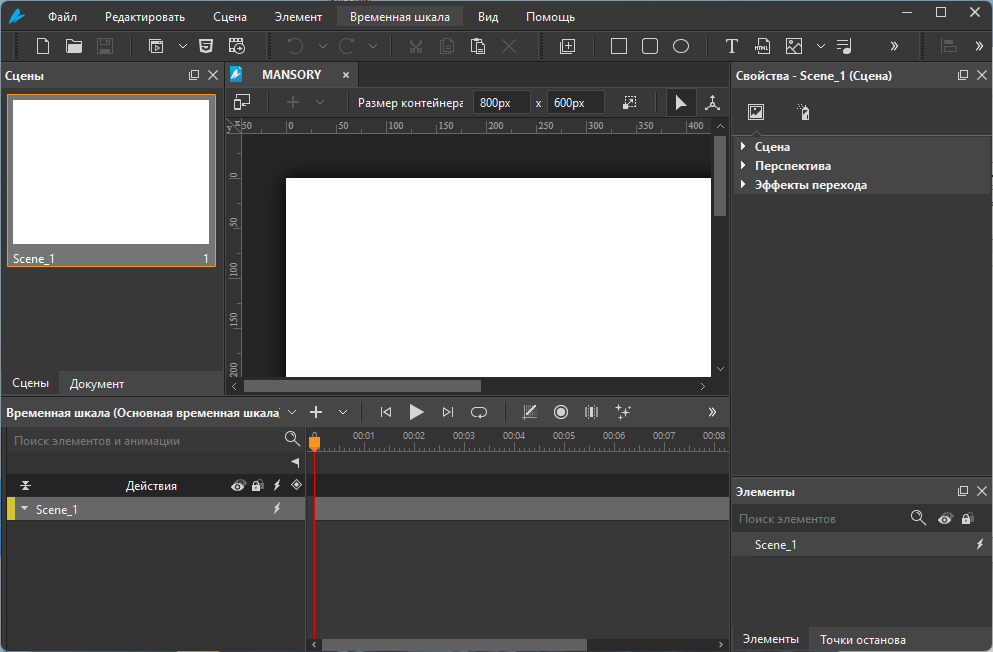
Saola Animate - очень удобная программа для создания анимации и экспортирования результата в HTML5 проект. Это значит, что вашу анимацию можно внедрить на любой сайт в интернете. Проектом может быть простая анимированная картинка, рекламный или презентационный баннер, игра или целое приложение. Есть шкала времени (таймлайн) и не одна, есть поддержка jаvascript, есть инструменты рисования векторных фигур или совершенно свободного рисования. Естественно, на объекты сцены можно навешивать гиперссылки и действия. Анимации поддаются самые разнообразные параметры сцены и объектов, включая перемещение в трехмерном пространстве.
Выдающиеся функции анимации, повышающие вашу креативность
• Scenes. Think of scenes as slides in Microsoft PowerPoint. Manage scenes to control the flow of your animations to create amazing visual experiences.
• Timelines. Timelines act as a container for animations and a ruler that measures time. Each scene can have multiple timelines to satisfy a large number of elements, animations, and interactivity. Control timeline playback to create rich and interactive animations.
• Auto-Keyframe. Auto-Keyframe allows automatically generating keyframes even in a specific range when creating animations. Accordingly, it makes keyframing easier and shortens the time you put in your animations.
• Shapes & Freeforms. A wide variety of predefined shapes are available at your fingertips. You can also import or draw lightweight vector graphics for the artwork in your animation.
• Freeform Editing Tools. Saola Animate 3.0 offers additional tools to edit shape paths (Add/Remove Anchor, Anchor Point Tool). Thanks to that, adding, deleting, or changing types of anchor points (Corner Point, Free Point, Smooth Point, and Straight Point) is just a breeze.
• Morph Animations. Animate from one shape’s form to another through a seamless transition with no coding skills required.
• Line Length Keyframe. Use the Line Length keyframe to create surprisingly hand-drawn animations or whiteboard animations.
• Preset Effects. Promptly apply the built-in effects in the Preset Effects gallery. Convert those default preset effects to keyframes for further customizing. Besides, it’ also possible to save keyframe animations as a custom effect to reuse later in other projects.
• Text Animations. Along with Preset Effects, text animations help create eye-catching content. By animating its letters or words, creating eye-popping text animations has never been so easy.
• Google & System Fonts. Let the typography speak with hundreds of gorgeous fonts from Google Fonts library and system fonts on your computer. Embed system fonts in the HTML5 output to get consistent appearance across browsers and devices.
• Sprite Sheets. A sprite sheet is a sequence of various graphics arranged in one bitmap image file. Thanks to sprite sheets, you can create an animated character representing one or several animation sequences while only needing to load a single file.
• Symbols. Use symbols to share identical elements, scenes, timelines, and animations across scenes or at different positions in the same scene.
• Motion Path. Motion Path is the best idea when it comes to creating movement. It allows you to draw complex curves than just a straight line, animating your object to move more naturally.
• Easing Methods. Easing specifies the speed at which a transition progresses over time. Up to 40 easing methods are at hand to make your animations more stunning and natural.
• Show Elements across Scenes. Make a single element appear in all scenes in your project. In each scene, you can separately create different animations for that element.
• Flexible Layout. Saola Animate supports flexible layout, that is, the size of the document adapts to the browser window size. Flexible layout allows your animations to run perfectly on any device and browser.
• Responsive Design. Make the page respond to the browser size at any given point, giving the optimal viewing experience across different devices and screen sizes.
• Interactivity. Interactivity is a great way to gain and keep audience’s attention and interest as it allows them to experience interactive control. Engage your viewers by adding actions and triggers in response to events such as a mouse click or a key press.
• Custom Elements. Custom elements come in handy when you want to create your own HTML tags. Free to create various new types of HTML elements through HTML code lines.
• Script Support. jаvascript comes in handy when you want to make your own interactivity. Saola Animate has a powerful built-in code editor with intelligent features, letting you quickly create and edit JS functions. The jаvascript API is also available to back you up at any time.
• External Script Resources. Import external HTML, CSS, and jаvascript files or URLs and use them to have the full control over the document. All the script resources are editable within the program.
• Export to Videos. Saola Animate 3.0 allows you to export projects to video for demonstration purposes. Just with a click, your content will be demonstrated easily after seconds.
• Export to HTML5. Turn your ideas into reality with dynamic, interactive, and engaging web content. HTML5 and its extensive functionality empower you to bring your vision to life with no end of advanced animations and interactivity.
ОС: Windows 10, 11 (64-bit only)
Скачать программу Saola Animate Pro 3.1.4 (131,3 МБ):
с Turbo.net | Katfile.com | Oxy.name |
Прямая ссылка на скачивание доступна только для группы: VIP-diakov.net

|
Другие новости по теме:
|
|

Комментарии
LazyMedia Deluxe Pro 3.463
От: SergeyKo
Спасибо!
Movavi Video Suite 2026.1.1
От: Home_135
Плохо не поддерживается формат H.265
Movavi Video Suite 2026.1.1
От: Bigfan
Спасибо автору))) Все работает. Даже порты создаются легко - тупо упаковкой WinRAR.
W10Privacy 6.2.0.0
От: igorstar50
а можно ли через эту программу включить то, что было отключено при установке винды 10
Auslogics SSD Optimizer Pro 2.2.0.6
От: tezaurus
прога - абсолютно бестолковая щляпа.
Windows 11 Version 26H1 with Update [28000.2704]
От: Guillermo Palma
?No viene en Espa?ol?
Movavi Video Converter 24.5.0
От: diakov
Дайте ссылку на премиум.
Movavi Video Converter 24.5.0
От: cron
Версия Премиум весит 205 Мб, это конечно не самый главный показатель ,тем более программы "докачиваются" , в процессе установки , но всё
LazyMedia Deluxe Pro 3.463
От: raum609
Спасибо!
Imagenomic Portraiture 5.0 Build 5003 | Noiseware 6.1.5 Build 6155 | RealGrain 3.1.5 Build 3155
От: sepp9876
Found the issue
WiFi Explorer Pro 1.2.5.0
От: commandor
Спасибо. Всё очень здорово. Всегда надо удалять старый софт.
Imagenomic Portraiture 5.0 Build 5003 | Noiseware 6.1.5 Build 6155 | RealGrain 3.1.5 Build 3155
От: sepp9876
Portraiture Crashes in Photoshop 27.9.1
Windows 11 Version 26H1 with Update [28000.2704]
От: valcraft
вышла для учебных заведений
WinRAR 7.23 Final
От: Sesharim
При выборе опции: Добавить в архив и отправить по email winrar зависает. В всплывающем окне прогресс бар "Добавление" - 100%, прогресс бар
Windows 11 Version 26H1 with Update [28000.2704]
От: valcraft
а у меня 26н2 стоит))))