

























































Mac OS / Интернет и сеть ⇒ Proxifier 4.14 + Portable
|

Proxifier позволяет сетевым приложениям, которые не поддерживают работу через прокси-серверы, работать через прокси и цепочки SOCKS или HTTPS.
Ключевые особенности:
• Через прокси. Перенаправляйте соединения любого интернет-приложения (браузер, электронная почта, база данных, игра и т.д.) через прокси.
• Управляйте своей корпоративной сетью. Управляйте доступом к ресурсам. Направьте все свои соединения через единую точку входа. Обновляйте несколько конфигураций удаленно из одного места.
• Улучшите ваше соединение. Направляйте интернет-трафик по более быстрым маршрутам.
• Безопасность и конфиденциальность. Легкая и гибкая альтернатива VPN. Туннелируйте свои соединения через зашифрованные каналы.
• Превышение ограничений. Используйте прокси-сервер в качестве шлюза для вашей деятельности в Интернете.
• Гибкость. Назначьте разные прокси или цепочки разным соединениям, используя систему на основе правил.
Network
• Proxifier can process all outgoing TCP connections.
• Full IPv6 support.
• Tunnel IPv4 connections through IPv6 proxy and vice versa.
Proxy Servers
• SOCKS 4 and SOCKS 4A (hostnames support) with User ID authentication.
• SOCKS 5 with Username/Password authentication.
• HTTPS with Basic and NTLM authentication (explicit and transparent modes).
• HTTP with Basic authentication (HTTP connections only).
• Tested with all major proxy server implementations including Microsoft ISA, Blue Coat, WinGate, Dante, Squid, Apache and others.
• Failover (redundancy list) allows assigning any number of back up proxies. Timeout is configurable.
• Proxy failure is transparent for the client application if redundancy is enabled.
• Each proxy can be assigned a short name (label) that can be conveniently used in other parts of Proxifier.
Proxy Chains
• Arbitrary length.
• Different proxy protocols can be used within the same chain.
• Proxies in the chain can be enabled/disabled.
• Convenient UI that allows chain creation and reordering with drag-and-drop.
• Load balancing chains.
Client Applications
• 32- and 64-bit applications support.
• Windows Services and applications run by other users (configurable).
• Proxification is transparent for the client applications.
• Best-in-class compatibility with the third party software. Automated conflict-resolution logic.
DNS
• System DNS and DNS over proxy supported.
• Hybrid mode.
• Automatic DNS mode detection.
• DNS over Proxy is supported for all proxy protocols.
• DNS exclusion list with wildcards (e.g. *.example.net).
Flexible Configuration
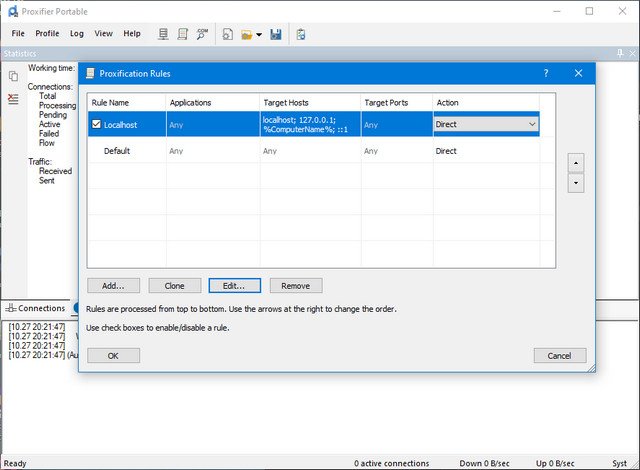
• Proxification rules can be based on application names, IP addresses, hostnames and port numbers.
• Each rule can be assigned to proxy, chain, block or direct connection.
• Rules are processed from top to bottom and can be reordered.
• Wildcards and masks are supported for applications, IP addresses and hostnames (e.g. *app.exe; 192.168.*.*; *.example.net).
• Ranges are supported for IP addresses and port numbers (e.g. 10.1.1.1–10.1.1.255; 80–1234).
• Live syntax check with highlighting.
• Individual rules can be enabled/disabled.
• Proxifier context menu (right-click on arbitrary .exe file) allows dynamic proxy selection for the application within a session.
Configuration Deployment and Management
• Configuration is stored in profile files (*.ppx).
• Human readable XML format.
• Unlimited length.
• Fast profile switching from a list.
• Profiles can be managed as files. Import and export is supported.
• Silent profile load with “Proxifier.exe profile-name.ppx silent-load” command.
• Profiles proxy passwords encryption with the current user login credentials or master password.
• Basic and AES 256-bit encryption supported.
• System-wide profile that is forcibly used for all users.
• User can enter login details interactively if login/password is blank in the profile.
• Proxifier can interactively ask login/password if authentication on proxy fails.
• Automatic profile update from a remote Web server. User’s proxy login details get preserved.
• An option to force profile passwords encryption via system registry.
• Fully compatible Proxifier profiles of Windows and Mac versions.
User Interface and Interaction
• Live information about connections including application name, target host, time/status, rule/proxy, received/sent bytes and more.
• Live traffic (bandwidth) graph.
• Live global statistics.
• Live output with 3 levels of verbosity.
• Color indication.
• System tray icon with traffic view.
• Adjustable UI that is persistent during restart (windows sizes, panes layout, etc).
Logs and Troubleshooting
• Detailed error messages.
• Log-file.
• Verbose mode for screen and log-file with a detailed output.
• Traffic dumps.
• Automatic self-check testing on each start.
• Automatic conflict detection logic.
• Custom crash reporter.
Системные требования:
• Windows (x86, x64) 7, 8, 10, 11
• Server 2008, 2012, 2016, 2019, 2022
Скачать прогармму Proxifier 4.14 + Portable + MacOS (13,45 МБ):
с Turbo.net | Uploadrar.com | Frdl.io | Katfile.cloud | Nitroflare.com | Htfl.net
Прямая ссылка на скачивание доступна только для группы: VIP-diakov.net

|
Другие новости по теме:
|
|

Комментарии
Adobe Lightroom Classic 2026 v15.5
От: Pippo
Я удалил старую версию и установил 15.5, и сообщения об истечении срока действия продукта, кажется, исчезли. Спасибо!
CPU-Z 3.01
От: mbl800
Спасибо.
Inspire Art AI Image Generator 1.2.5
От: Bronek
Версия 1.2.5 - открывается (в том числе и с VPN, кстати, отдельное спасибо за Avira ) чёрное окно и - только (W11pro25H2). Исправить возможно?
Vivaldi 8.1 Build 4087.68 + Portable
От: heavyg
https://downloads.vivaldi.com/stable/Vivaldi.8.1.4087.70.x64.exe
Wondershare PDFelement Professional 12.2.0.4408 + Portable
От: svetloslav
You need to edit your hosts file with the link here from github. All those Chinese companies are forcing updates and setting up update servers that
Изменения для текущих и будущих пользователей группы VIP-diakov.net
От: diakov
Это только пример (скриншот), нажмите на кнопку стать вип пользователем, там выберите СБП и тогда будет валидный код
Изменения для текущих и будущих пользователей группы VIP-diakov.net
От: bato
в этом QR коде нет нужных реквизитов для платежа
JetBrains PhpStorm 2026.1.4
От: MaxA
Стало, 2 недели норм
PDFCreator 3.3.0 Build 2468 Plus / Business
От: diakov
не понятно че хотите.
PDFCreator 3.3.0 Build 2468 Plus / Business
От: K-Yukki
Is there a possibility of this being updated?
Uninstall Tool 3.8.2 Build 5762
От: diakov
поправил, теперь порядок.
Adobe Premiere Pro 2026 v26.3.2
От: diakov
Переустановить, выйти из учетки Adobe, попробовать другую версию.
Internet Download Manager 6.43.10
От: AlexDonetsk
Если у Вас ЮТЮБ работает без проблем, то это не значит, что у других с ним проблем нет. Например, в моём случае, я могу СТАБИЛЬНО смотреть обычно в
Adobe Photoshop 2025 v26.11 + macOS + Portable
От: An4aR
Со вчерашнего дня 2025-я версия ФШ (одна из сборок с сайта) при каждой попытке открытия через полсекунды попросту вылетает. Перекрыл доступ в сеть
Internet Download Manager 6.43.10
От: Гость Гость
Что вы скачиваете с ютуба? Что там такого, что бы скачивать? Накапливать, громоздить, забивать HDD...??? Сохраните ссылки и заходите бесконечно.